<?xml version="1.0" encoding="utf-8"?><feed xmlns="http://www.w3.org/2005/Atom" ><generator uri="https://jekyllrb.com/" version="4.4.1">Jekyll</generator><link href="https://androidhacker.club/feed.xml" rel="self" type="application/atom+xml" /><link href="https://androidhacker.club/" rel="alternate" type="text/html" /><updated>2026-08-18T15:30:47+00:00</updated><id>https://androidhacker.club/feed.xml</id><title type="html">Android Hacker Club</title><subtitle>Android privacy, security, apps, and mobile tinkering notes.</subtitle><entry><title type="html">Restricting Data Access to Certain Apps</title><link href="https://androidhacker.club/restricting-data-access-to-certain-apps/" rel="alternate" type="text/html" title="Restricting Data Access to Certain Apps" /><published>2023-03-07T03:52:11+00:00</published><updated>2023-03-07T03:52:11+00:00</updated><id>https://androidhacker.club/restricting-data-access-to-certain-apps</id><content type="html" xml:base="https://androidhacker.club/restricting-data-access-to-certain-apps/"><![CDATA[<p class="wp-block-paragraph">As I prepare to travel internationally, I want to restrict data access to certain applications. I&#8217;m using Android 13 as of writing this (Your version is found at Settings -&gt; About Phone), so the tools I mention might be different on your version. <br /></p>

<p class="wp-block-paragraph">All of these tools are found under the Settings options, where you can search for them: </p>

<h2 class="wp-block-heading">Data Usage</h2>

<p class="wp-block-paragraph">Under data usage I found <strong>Mobile Data Usage</strong> which shows my my used apps. I don&#8217;t see a way to do it in bulk, so for each app you can click on it and and turn <strong>Background Data</strong> to off. </p>

<h2 class="wp-block-heading">Data Saver</h2>

<p class="wp-block-paragraph">By turning this one, only apps with unrestricted access will be able to access data, see the next section.</p>

<h2 class="wp-block-heading">Unrestricted Data</h2>

<p class="wp-block-paragraph">This was found under <strong>Special App access</strong>, Carrier Services is the only one I left on.</p>

<h2 class="wp-block-heading">Data warning and Limit</h2>

<p class="wp-block-paragraph">Normally at home I don&#8217;t need to turn this on as I have a great data plan, but in the case of travel, I set a warning to 3/4 of my eSIM/data or data carrier limit when I&#8217;m in the new region. </p>

<p class="wp-block-paragraph"></p>

<p class="wp-block-paragraph">While traveling, my Android offers an eSIM option, and I use <a href="https://www.airalo.com/">AirOLO</a> for eSIM service. If you use it, feel free to use my referral code of KRIS1850</p>

<p class="wp-block-paragraph"></p>]]></content><author><name></name></author><summary type="html"><![CDATA[As I prepare to travel internationally, I want to restrict data access to certain applications. I’m using Android 13 as of writing this (Your version is foun...]]></summary></entry><entry><title type="html">App Review: F-Droid</title><link href="https://androidhacker.club/app-review-f-droid/" rel="alternate" type="text/html" title="App Review: F-Droid" /><published>2021-01-26T23:40:43+00:00</published><updated>2021-01-26T23:40:43+00:00</updated><id>https://androidhacker.club/app-review-f-droid</id><content type="html" xml:base="https://androidhacker.club/app-review-f-droid/"><![CDATA[<p class="wp-block-paragraph">F-Droid is not just an application, but it&#8217;s an application repository of apps that are <a href="https://en.wikipedia.org/wiki/Free_and_open-source_software">Free and Open Source software (FOSS)</a>.</p>

<p class="wp-block-paragraph"><a href="https://f-droid.org/" data-type="URL" data-id="https://f-droid.org/">Official Website</a></p>

<p class="wp-block-paragraph">You can <a href="https://f-droid.org/F-Droid.apk">download the official APK installer here</a>. </p>

<h2 class="wp-block-heading">Install: </h2>

<p class="wp-block-paragraph">When trying to open an APK file on Android, you have to choose to allow whatever app you&#8217;re using to open the file, the permission to install applications, which is dangerous. Google wants you to only trust their Play Store for installing apps.</p>

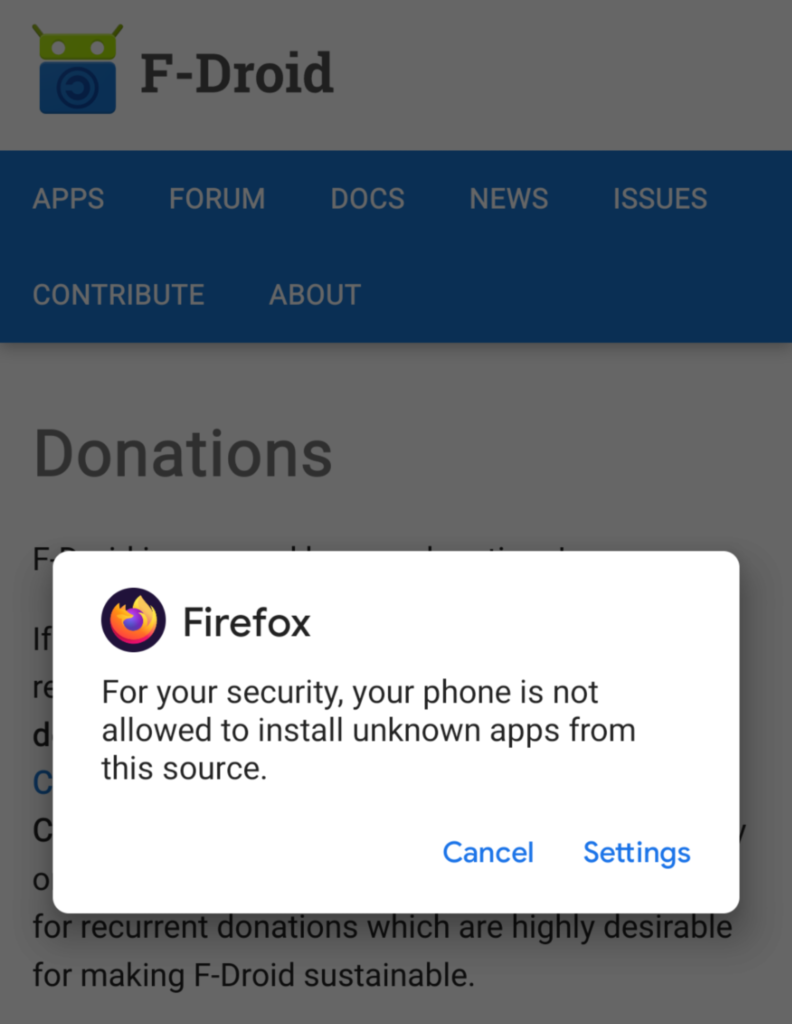
<p class="wp-block-paragraph">Because I opened it with Firefox, Android is asking me if I want to trust opening APKs from Firefox, which is very dangerous as then any time I accidentally click on an APK file on a website it may try to install it: </p>
<figure class="wp-block-image size-large is-resized"><img loading="lazy" decoding="async" src="/assets/img/Screenshot_20210126-150926-792x1024.png" alt="" class="wp-image-24" width="198" height="256" /></figure>

<p class="wp-block-paragraph">so I chose cancel. Instead, I used my file manager to find the fdroid.apk file I downloaded, and chose to allow it to open the APK file. I chose to allow from this source, and then clicked on Install. </p>

<h2 class="wp-block-heading">Running F-Droid: </h2>

<p class="wp-block-paragraph">The first time I ran it, I waited a few minutes for it to update its repository list. Once that is complete, I now have a large repository of free, and open source applications I can choose to install. </p>

<p class="wp-block-paragraph">When I chose my first app to install, in my case the Simple File Manager, I once again was prompted to choose to trust installing apps from the F-Droid app and I chose to accept this risk.</p>

<p class="wp-block-paragraph">I am trusting the team at Fdroid in their <a href="https://f-droid.org/en/docs/FAQ_-_General/#is-your-building-and-signing-process-secure">building and signing of apps</a>, and once you install any app, when you open it for the first time, it will request any permissions it wants. You can choose to Allow or Deny any permissions you wish, although you&#8217;ll find out quickly if you deny a permission the application demands, it will prompt you again to allow that permission or the application won&#8217;t work as intended. When in doubt, don&#8217;t install the app, or if you have it installed, uninstall it. </p>

<p class="wp-block-paragraph"></p>]]></content><author><name></name></author><summary type="html"><![CDATA[F-Droid is not just an application, but it’s an application repository of apps that are Free and Open Source software (FOSS). Official Website You can downlo...]]></summary></entry><entry><title type="html">App Review: Fing</title><link href="https://androidhacker.club/app-review-fing/" rel="alternate" type="text/html" title="App Review: Fing" /><published>2021-01-26T22:51:39+00:00</published><updated>2021-01-26T22:51:39+00:00</updated><id>https://androidhacker.club/app-review-fing</id><content type="html" xml:base="https://androidhacker.club/app-review-fing/"><![CDATA[<p class="wp-block-paragraph">Fing is a fast and handy tool for seeing what other devices are on your network.</p>

<p class="wp-block-paragraph"><a href="https://www.fing.com/products/fing-app">Official Fing Website</a><br /><br />You can <a href="https://play.google.com/store/apps/details?id=com.overlook.android.fing&amp;hl=en" data-type="URL" data-id="https://play.google.com/store/apps/details?id=com.overlook.android.fing&amp;hl=en">download Fing from the Google Play store</a>. </p>

<h2 class="wp-block-heading">Install</h2>

<p class="wp-block-paragraph">During install it forces you to go through a few options, for the first screen I just clicked &#8220;Next&#8221;. The second screen has a hidden option under the big blue &#8220;Agree and Continue&#8221; which says &#8220;Review Settings and Policies&#8221; and I recommend you click this instead. I turned off  &#8220;Crash Reporting&#8221; and  &#8220;Allow interest-based ads&#8221;. I chose to skim the Privacy Policy which includes &#8220;<em>2. Information on MAC addresses and Wi-Fi networks you collect through the App or the Fingbox</em>&#8220;. This means I strongly advise you to only allow firewall access to this app on your local internal network/subnet and not allow it full internet access to phone this information home. <br />You may choose to cancel and uninstall it here until you&#8217;re comfortable it can not reach the public internet. <br />The privacy policy also states under IV(d) &#8220;<em>in the event we sell or buy any business or assets, in which case we may disclose your information to the prospective seller or buyer…</em>&#8220;</p>

<p class="wp-block-paragraph">If you then go back and click &#8220;Agree and Continue&#8221; it&#8217;s not obvious if your changes were accepted, and there is no obvious way to go back and check. This is a UX fail. </p>

<p class="wp-block-paragraph">The next screen says &#8220;Enable location&#8221; but underneath you can choose &#8220;Continue without location&#8221;</p>

<p class="wp-block-paragraph">The next screen says &#8220;Sign me in&#8221; if you want to create an account, or underneath you can choose &#8220;I&#8217;ll think about it&#8221; which I have done. </p>

<p class="wp-block-paragraph">The next screen wants to start collecting information about you, but there is a &#8220;Maybe later&#8221; option at the bottom. You should now be into the application and ready to click:</p>

<h2 class="wp-block-heading">Scan for Devices</h2>

<p class="wp-block-paragraph">The app will ask you again for location permissions if you denied it during install. I denied it again and it still seemed to work anyway. </p>

<p class="wp-block-paragraph">The scan happened incredibly fast. It detected the 5-10 devices on my internet network in about 7 seconds with device fingerprinting completed. This means it not only gave the internet address (IP) of each device, but it assigned it an icon depending on the type of device, as well as listing the vendor and model name of each device based on the MAC address. </p>

<h2 class="wp-block-heading">Summary</h2>

<p class="wp-block-paragraph"><strong>This application fails in terms of privacy</strong>, it does not keep your scans local to your phone as disclosed in the privacy policy, and they may sell / share your information with pretty much anyone, including your device information and any personal information their scans pick up. </p>

<p class="wp-block-paragraph">It is effective in terms of offering the intended service, scanning the devices on your network quickly and identifying them.<br /></p>]]></content><author><name></name></author><summary type="html"><![CDATA[Fing is a fast and handy tool for seeing what other devices are on your network. Official Fing WebsiteYou can download Fing from the Google Play store. Insta...]]></summary></entry><entry><title type="html">Netflix announces xHE-AAC audio</title><link href="https://androidhacker.club/netflix-announces-xhe-aac-audio/" rel="alternate" type="text/html" title="Netflix announces xHE-AAC audio" /><published>2021-01-26T19:17:41+00:00</published><updated>2021-01-26T19:17:41+00:00</updated><id>https://androidhacker.club/netflix-announces-xhe-aac-audio</id><content type="html" xml:base="https://androidhacker.club/netflix-announces-xhe-aac-audio/"><![CDATA[<p class="wp-block-paragraph">From their <a href="https://netflixtechblog.com/optimizing-the-aural-experience-on-android-devices-with-xhe-aac-c27714292a33">blog announcement</a>:</p>

<p class="wp-block-paragraph"><em>At Netflix, we are passionate about delivering great audio to our members. We began streaming 5.1 channel surround sound in 2010, <a rel="noreferrer noopener" href="https://media.netflix.com/en/company-blog/dolby-atmos-coming-to-netflix" target="_blank">Dolby Atmos in 2017</a>, and <a rel="noreferrer noopener" target="_blank" href="https://netflixtechblog.com/engineering-a-studio-quality-experience-with-high-quality-audio-at-netflix-eaa0b6145f32">adaptive bitrate audio in 2019</a>. Continuing in this tradition, we are proud to announce that Netflix now streams Extended HE-AAC with MPEG-D DRC (<a rel="noreferrer noopener" href="https://www.iis.fraunhofer.de/en/ff/amm/broadcast-streaming/xheaac.html" target="_blank">xHE-AAC</a>) to compatible Android Mobile devices (Android 9 and newer). With its capability to improve intelligibility in noisy environments, adapt to variable cellular connections, and scale to studio-quality, xHE-AAC will be a sonic delight to members who stream on these devices.</em></p>

<p class="wp-block-paragraph"><a href="https://netflixtechblog.com/optimizing-the-aural-experience-on-android-devices-with-xhe-aac-c27714292a33">Read more&#8230;</a></p>]]></content><author><name></name></author><summary type="html"><![CDATA[From their blog announcement: At Netflix, we are passionate about delivering great audio to our members. We began streaming 5.1 channel surround sound in 201...]]></summary></entry><entry><title type="html">Android Versions</title><link href="https://androidhacker.club/__trashed/" rel="alternate" type="text/html" title="Android Versions" /><published>2021-01-26T09:31:49+00:00</published><updated>2021-01-26T09:31:49+00:00</updated><id>https://androidhacker.club/__trashed</id><content type="html" xml:base="https://androidhacker.club/__trashed/"><![CDATA[<p class="wp-block-paragraph">The latest version of Android as of writing this is Android 11.0 which was released on September 08, 2020. Older versions of Android had a version number and a cute dessert related name, and although Android 11 was called &#8220;Red Velvet Cake&#8221; internally, publicly it&#8217;s just been called Android 11.</p>

<p class="wp-block-paragraph">You can find the <a href="https://en.wikipedia.org/wiki/Android_version_history">entire version history on Wikipedia</a>, and you can check and update your version following <a href="https://support.google.com/android/answer/7680439?hl=en">Google&#8217;s Android help article</a>. For everything else Android 11, check out the <a href="https://www.android.com/android-11/">official Android 11 page</a>.</p>]]></content><author><name></name></author><summary type="html"><![CDATA[The latest version of Android as of writing this is Android 11.0 which was released on September 08, 2020. Older versions of Android had a version number and...]]></summary></entry></feed>